CKA를 준비하면서 공부한 요약 내용입니다.
Kubernetes Security Primitives
Secrure Hosts
- Password based authentication disabled
- SSH Key based authentication
Secure kubernetes
- kube-apiserver
- Who can access?
- What can they do?
Authentication
Who can access?
- Files - Username and Passwords
- Fiels - Username and Tokens
- Certificates
- External Authenication providers - LDAP
- Service Accounts
Authorization
What can they do?
- RBAC Authorization
- ABAC Authorization
- Node Authorization
- Webhook Mode
TLS Certificates
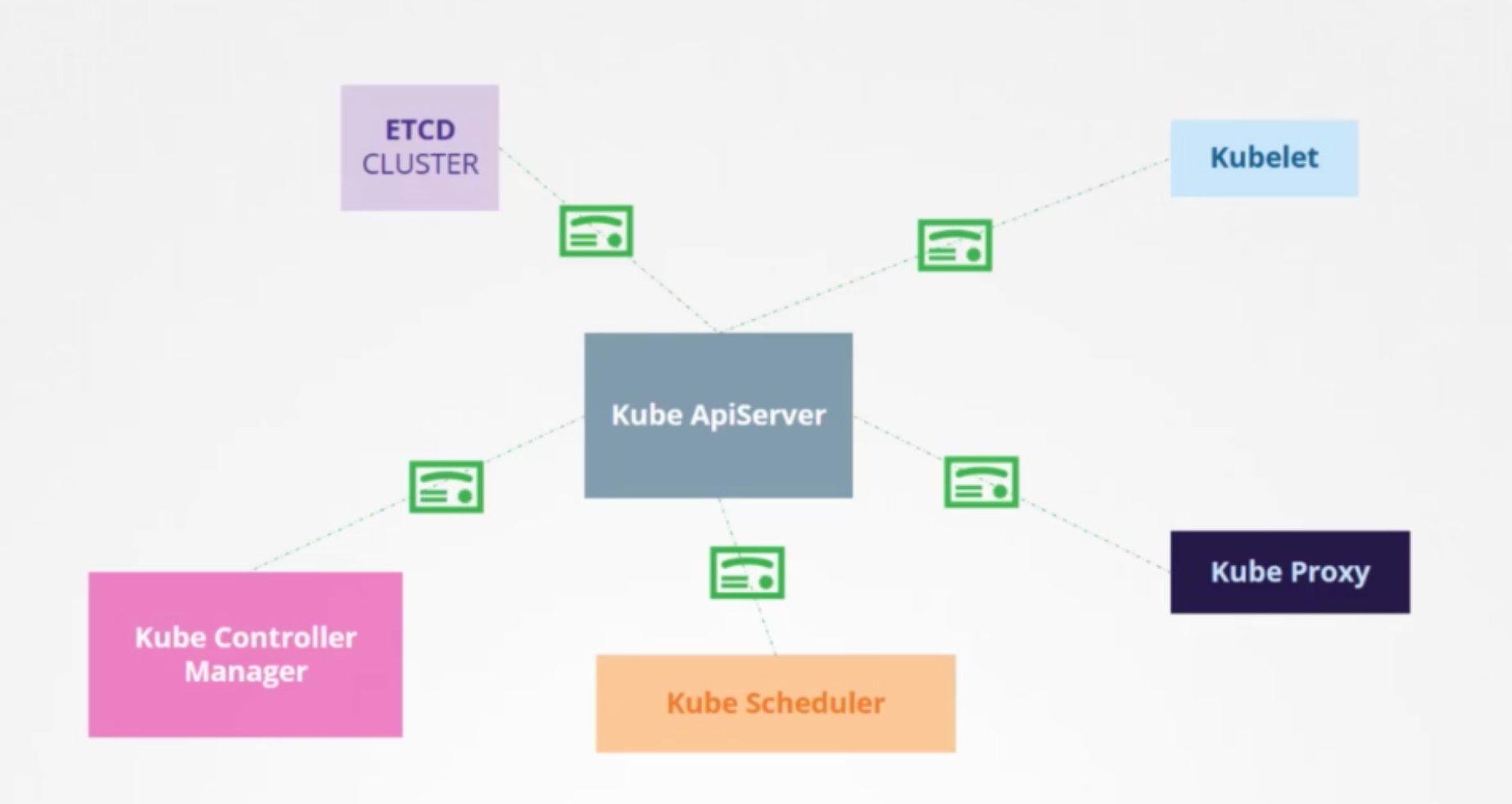
Network Policies
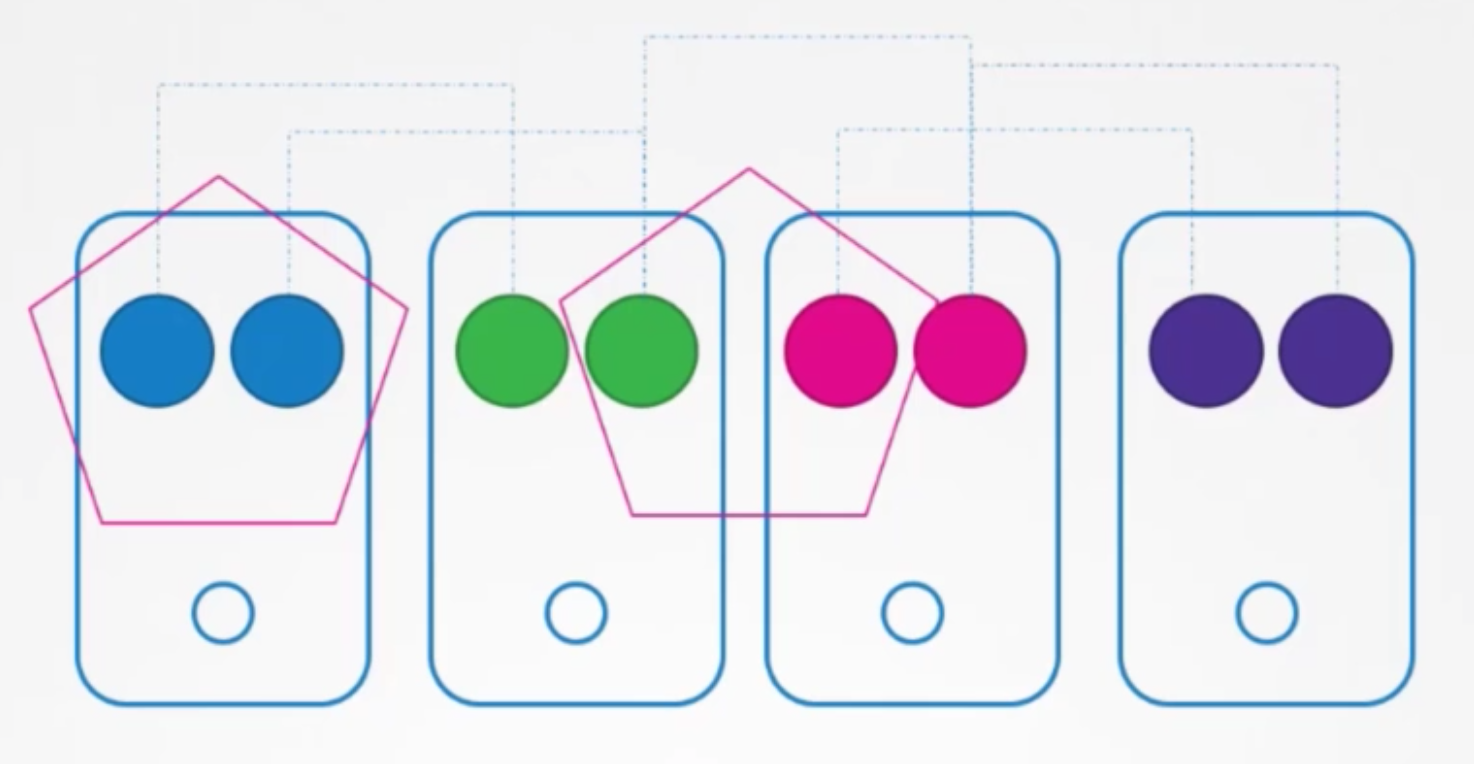
Authentication
Users
- Admins
- Developers
- Application End Users
- Bots
Accounts
- User
- Admins
- Developers
- Servcie Accounts
- Bots
- not supported officialy in k8s
Auth Mechanisms
- kube-apiserver
- Static Password File
- Static Token File
- Certificates
- Identity Service
Basic - file
user-details.csv1 2password123,user1,u0001 password123,user2,u0002kube-apiserver.service1 2 3ExecStart=/usr/local/bin/kube-apiserver \ --basic-auth-file=user-details.csv \ ...- kubeadm
1 2 3 4 5 6 7 8 9 10 11 12 13apiVersion: v1 kind: Pod metadata: creationTimestamp: null name: kube-apiserver namespace: kube-system spec: containers: - command: - kube-apiserver - --authorization-mode=Node,RBAC <content-hidden> - --basic-auth-file=/tmp/users/user-details.csv - pod
1 2 3 4 5 6 7 8 9 10 11 12 13 14 15 16 17 18 19 20 21apiVersion: v1 kind: Pod metadata: name: kube-apiserver namespace: kube-system spec: containers: - command: - kube-apiserver <content-hidden> image: k8s.gcr.io/kube-apiserver-amd64:v1.11.3 name: kube-apiserver volumeMounts: - mountPath: /tmp/users name: usr-details readOnly: true volumes: - hostPath: path: /tmp/users type: DirectoryOrCreate name: usr-details - Authenticate User
curl -v -k <https://master-node-ip:6443/api/v1/pods> -u "user1:password123"
Basic - token
user-token-details.csv1 2asdfbasdhjasdhjkfhjk12312,user1,u0001 1234g23rgy8werfg89asdfasd,user2,u0002kube-apiserver.service1 2 3ExecStart=/usr/local/bin/kube-apiserver \ --token-auth-file=user-details.csv \ ...- kubeadm
kubectl edit
- Authenticate User
curl -v -k <https://master-node-ip:6443/api/v1/pods> --header "Authorization: Bearer asdfbasdhjasdhjkfhjk12312
TLS
- master node
- worker nodes
Server Certificates for Servers
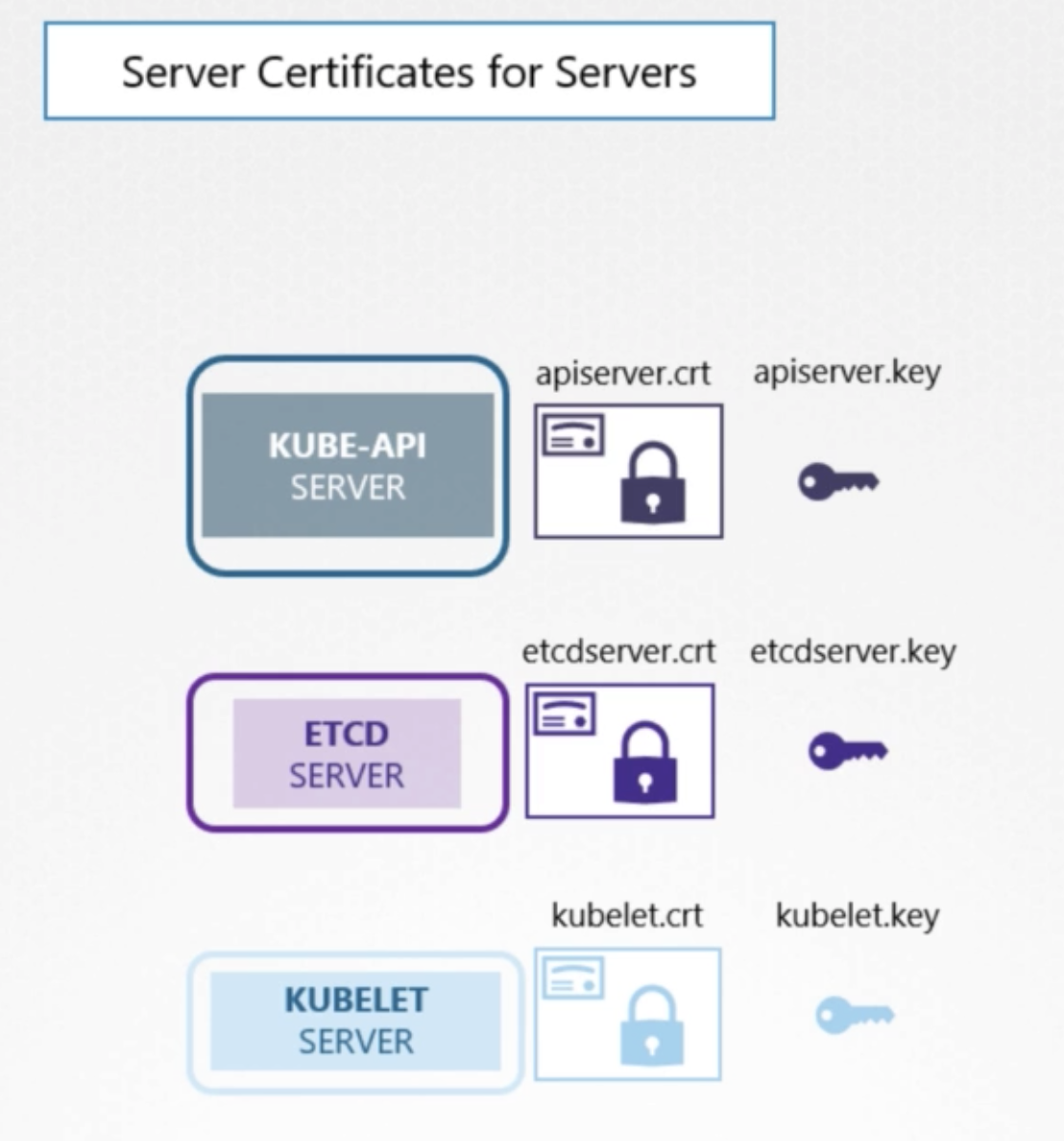
Kube-Api server
- exposes a service that other components as well as external users use to manage the k8s cluster
- server
- certificates to secure all communications with its clients
apiserver.crtapiserver.key
ETCD Server
etcdserver.crtetcdserver.key
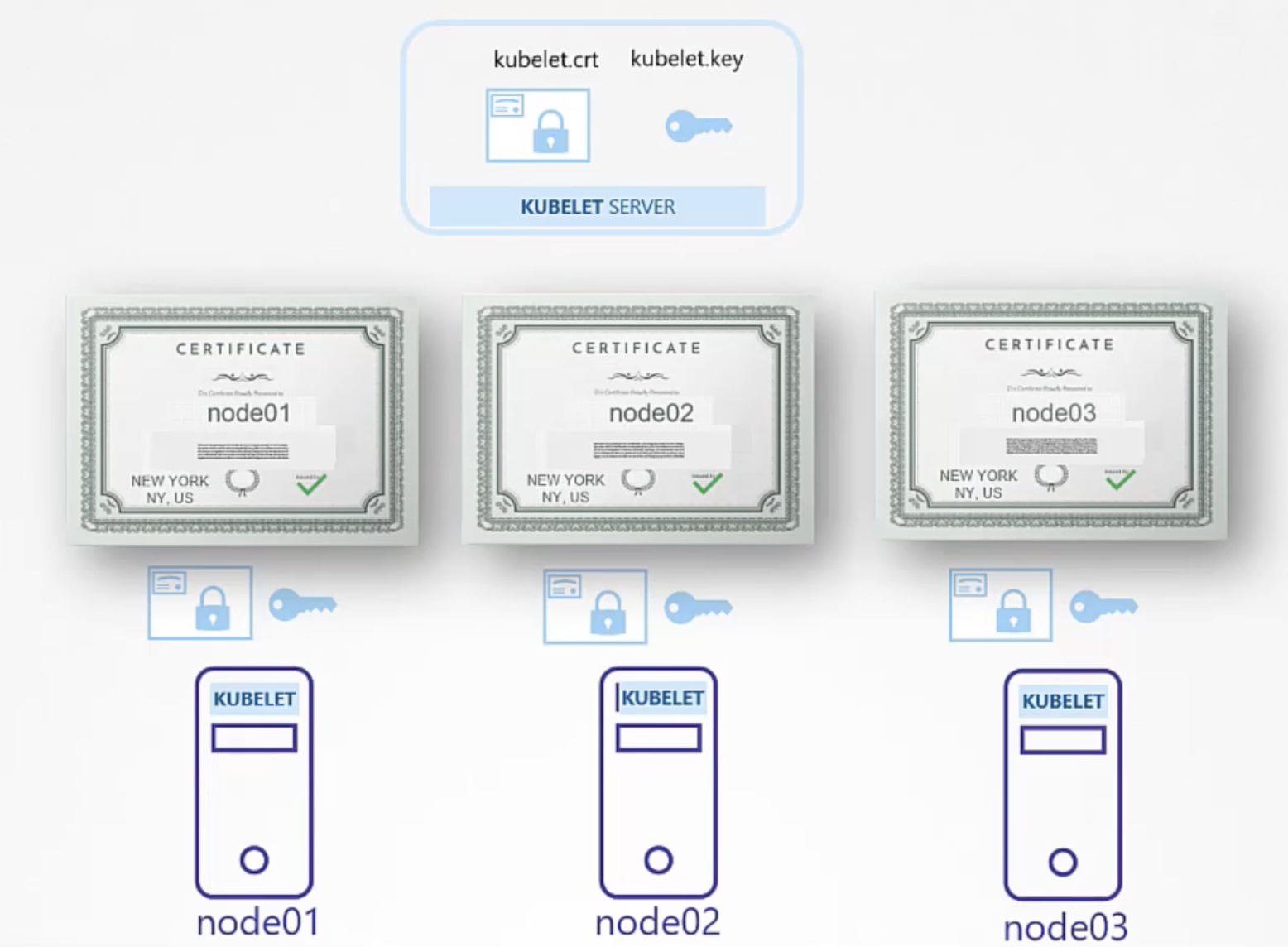
KUBELET Server
kubelet.crtkubelet.key
Client Certificates for Clients
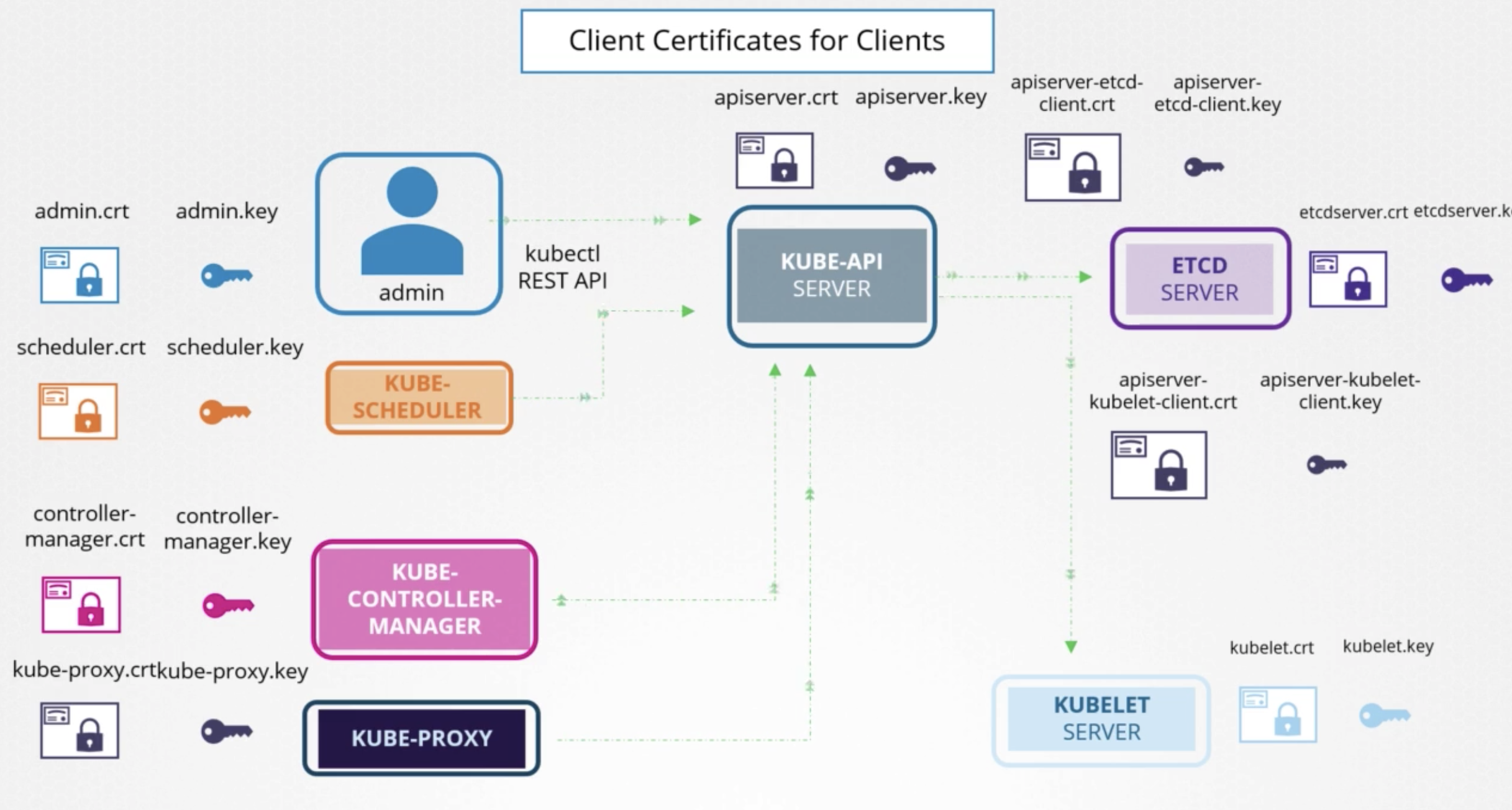
Admin
admin.crtadmin.key
Kube-Scheduler
scheduler.crtscheduler.key
Kube-Controller-Manager
controll-manager.crtcontroll-manager.key
Kube-Proxy
kube-proxy.crtkube-proxy.key
Certification Creation
OpenSSL to Create Client Certification
- Certificate Authority(CA)
- Generate Keys (ca.key)
openssl genrsa -out ca.key 2048
- Certificate Signing Requests (ca.csr)
openssl req -new -key ca.key -subj "/CN=KUBERNETES-CA" -out ca.csr
- Sign Certificates (ca.crt)
openssl x509 -req -in ca.csr -signkey ca.key -out ca.crt
- Generate Keys (ca.key)
- Admin User
- Generate Keys (admin.key)
openssl genrsa -out admin.key 2048
- Certificate Signing Requests (admin.csr)
openssl req -new -key admin.key -subj "/CN=kube-admin/O=system:masters" -out admin.csr"/CN=kube-admin/O=system:masters"← admin user
- Sign Certificates (admin.crt)
openssl x509 -req -in admin.csr -signkey ca.key -out admin.crt
- Generate Keys (admin.key)
- Kube Scheduler
- Kube Controller Manager
- kube Proxy
How to use
curl <https://kube-apisever:6443/api/v1/pods> --key admin.key --cert admin.crt --cacert ca.crt- definition
1 2 3 4 5 6 7 8 9 10 11 12apiVersion: v1 clusters: - cluster: certificate-authority: ca.crt server: <https://kube-apiserver:6443> name: kubernetes kind: Config users: - name: kubernetes-admin user: client-certificate: admin.crt clinet-key: admin.key
OpenSSL to Create Server Certification
ETCD Servers
| |
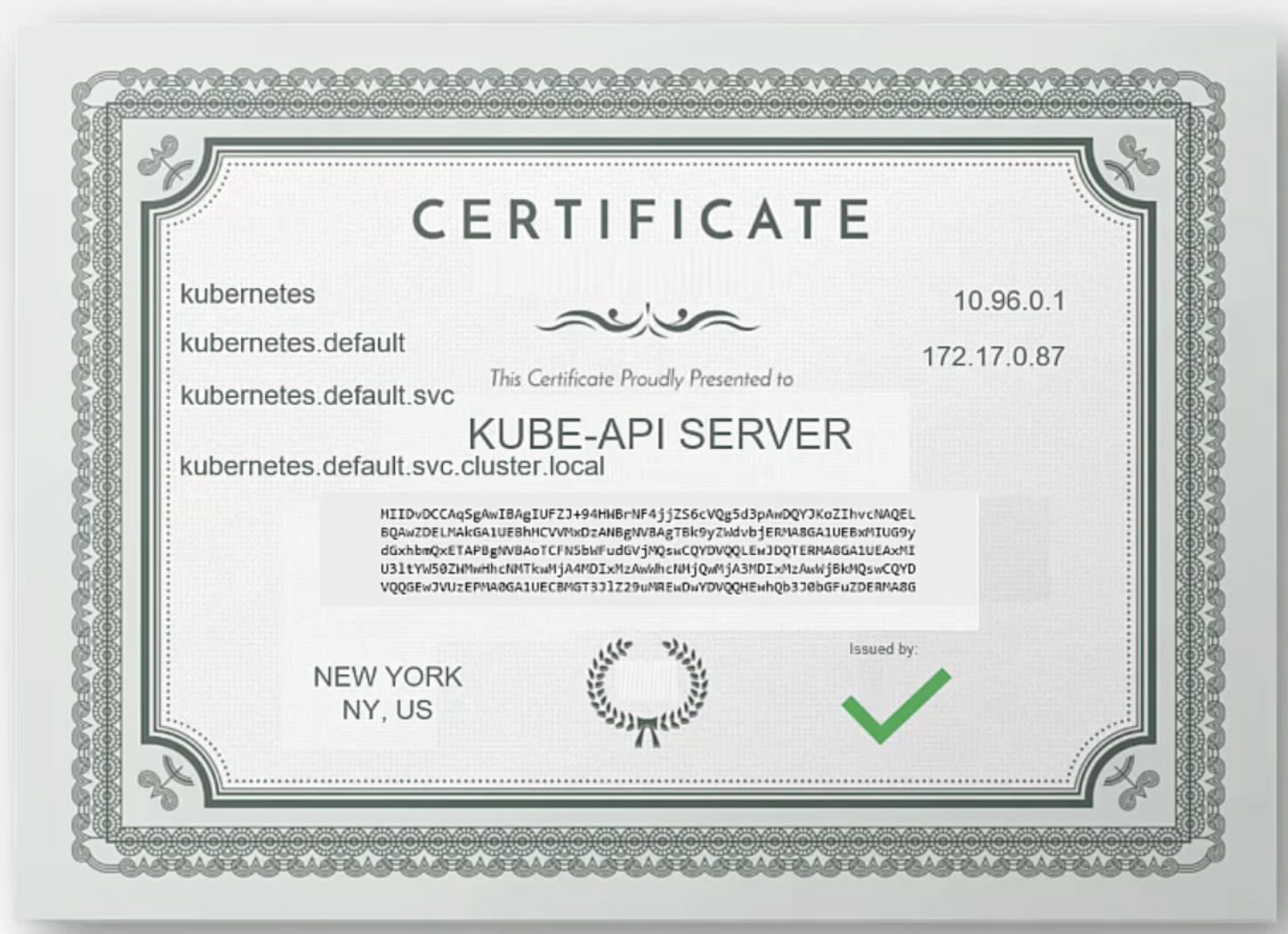
Kube-Api Server
- Generate Keys (apiserver.key)
openssl genrsa -out apiserver.key 2048
- Certificate Signing Requests (apiserver.csr)
openssl.cnf1 2 3 4 5 6 7 8 9 10 11 12 13[req] req_extensions = v3_req [ v3_req ] basicConstraints = CA:FALSE keyUsage = nonRpudiation, subjectAltName = @alt_names [alt_names] DNS.1 = kubernetes DNS.2 = kubernetes.default DNS.3 = kubernetes.default.svc DNS.4 = kubernetes.default.svc.cluster.local IP.1 = 10.96.0.1 IP.2 = 172.17.0.87openssl req -new -key apiserver.key -subj "/CN=kube-apiserver" -out apiserver.csr -config openssl.cnf
- Sign Certificates (apiserver.crt)
openssl x509 -req -in apiserver.csr -CA ca.crt -CAkey ca.key -out apiserver.crt
Kubelet Server
- server cert
- definition
1 2 3 4 5 6 7 8 9 10 11 12 13 14 15apiVersion: kubelet.config.k8s.io/v1beta1 kind: KubeletConfiguration authentication: x509: clientCAFile: "/var/lib/kubernetes/ca.pem" authorization: mode: Webhook clusterDomain: "cluster.local" clusterDNS: - "10.32.0.10" podCIDR: "$(POD_CIDR)" resolveConf: "/run/systemd/resolve/resolv.conf" reuntimeRequrestTimeout: "15m" tlsCertFile: "/var/lib/kubelet/kubelet-node01.crt" tlsPrivateKeyFile: "/var/lib/kubelet/kubelet-node01.key"
- definition
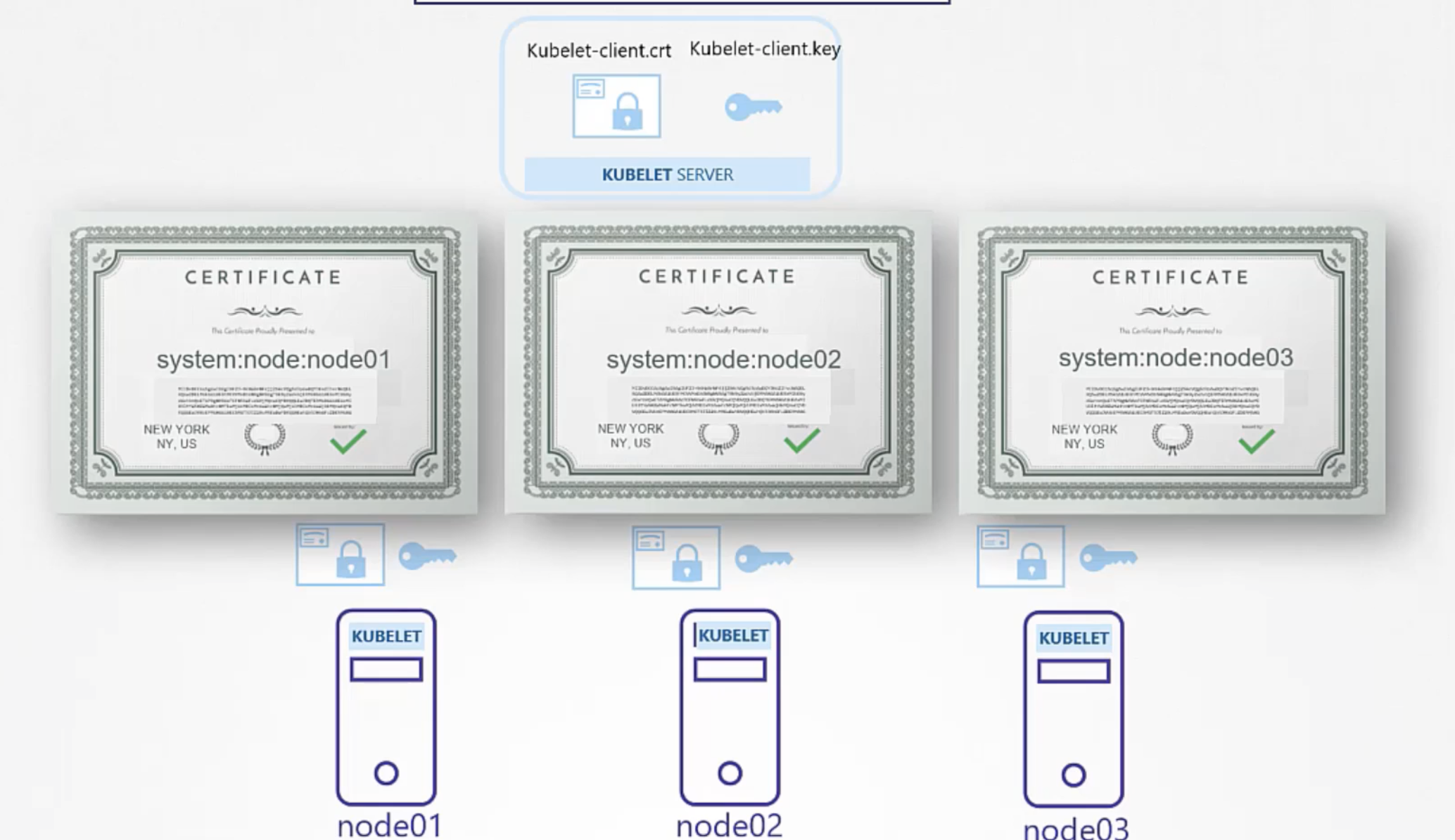
- client cert
View Certificate Details
- The Hard Way
cat /etc/systemd/system/kube-apiserver.service
- kubeadm
cat /etc/kubernetes/manifest/kube-apiserver.yaml
Inspect Service Logs
journalctl -u etcd.service
View Logs
kubectl logs etcd-master
Certificates API
Certificate Signing Request
Order
- Create
CertificateSigningReqeustObject - Review Requests
- Approve Requests
- Share Certs to Users
Request
openssl genrsa -out jan.key 2048openssl req -new -key jane.key -subj "/CN=jane" -out jan.csr- send to the administrator
- administrator takes the key and creates a
CertifacteSigningRequestobejct1 2 3 4 5 6 7 8 9 10 11 12 13apiVersion: certificates.k8s.io/v1beta1 kind: CeritifcateSigningRequest metadata: name: jane spec: groups: - system:authenticated usage: - digital signature - key encipherment - server auth request: <cat jane.csr | base64>cat akshay.csr | base64 | tr -d "\\n"
Approve
kubectl get csr1 2 3> k get csr NAME AGE SIGNERNAME REQUESTOR CONDITION akshay 10s kubernetes.io/kube-apiserver-client kubernetes-admin Pendingkubectl certificate approve jane
상세 요청
kubectl get csr jane -0 yaml
Deny
kubectl certificate deny agent-smith
Delete
kubectl delete csr agent-smith
Contoller Manager
- CSR-APPROVING
- CSR-SIGNING
cat /etc/kubernetes/manifests/kube-controller-manager.yaml
Kubeconfig
Using kubectl with crt
| |
- this is tedious task
- → move it to config file
Using kubectl with config file
- config
1 2 3 4--server my-kube-playground:6443 --client-key admin.key --client-certificated admin.crt --certificate-authority ca.crt - kubectl
kubectl get pods --kubeconfig config- default config file path
.kube/config
KubeConfig File
- clusters
- development
- production
--server my-kube-playground:6443
- contexts
- match cluster and users
- admin@production
- dev@google
- mykubeadmin@mykubeplayground
- match cluster and users
- users
- admin
- dev user
- prod user
1 2 3--client-key admin.key --client-certificated admin.crt --certificate-authority ca.crt - defintion
1 2 3 4 5 6 7 8 9 10 11 12 13 14 15 16 17 18 19 20 21apiVersion: v1 kind: Config current-context: dev-user@google clusters: - name: my-kube-playground cluster: certificate-authority: ca.crt server: my-kube-playground:6443 - name: ... contexts: - name: my-kube-admin@my-kube-playground context: clusters: my-kube-playground user: my-kube-admin - name: ... users: - name: my-kube-admin user: client-certificate: admin.crt client-key: admin.key - name: ...current-context- default context
certificate-authority- instead file path using data directly
certificate-authority-data- with base64 encoding
Command Line Tool
- view
kubectl config viewkubectl config view --kubeconfig=<config-file-name>
- update
kubectl config use-context prod-user@production
- helo
kubectl config -h
API Groups
Example
curl <https://kube-master:6443/version>curl <https://kube-master:6443/api/v1/pods>
Types
/metrics/healthz/version/api/apis/logs
API, APIS
api- core group
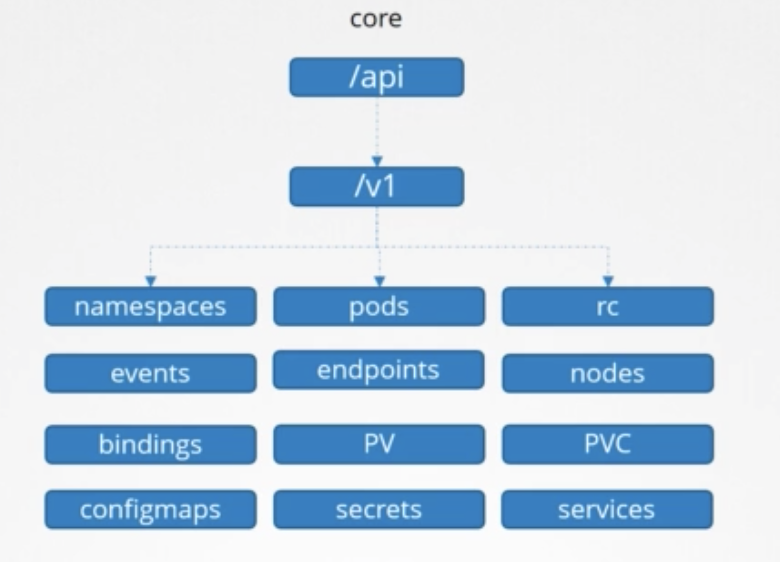
- core group
apis- named group
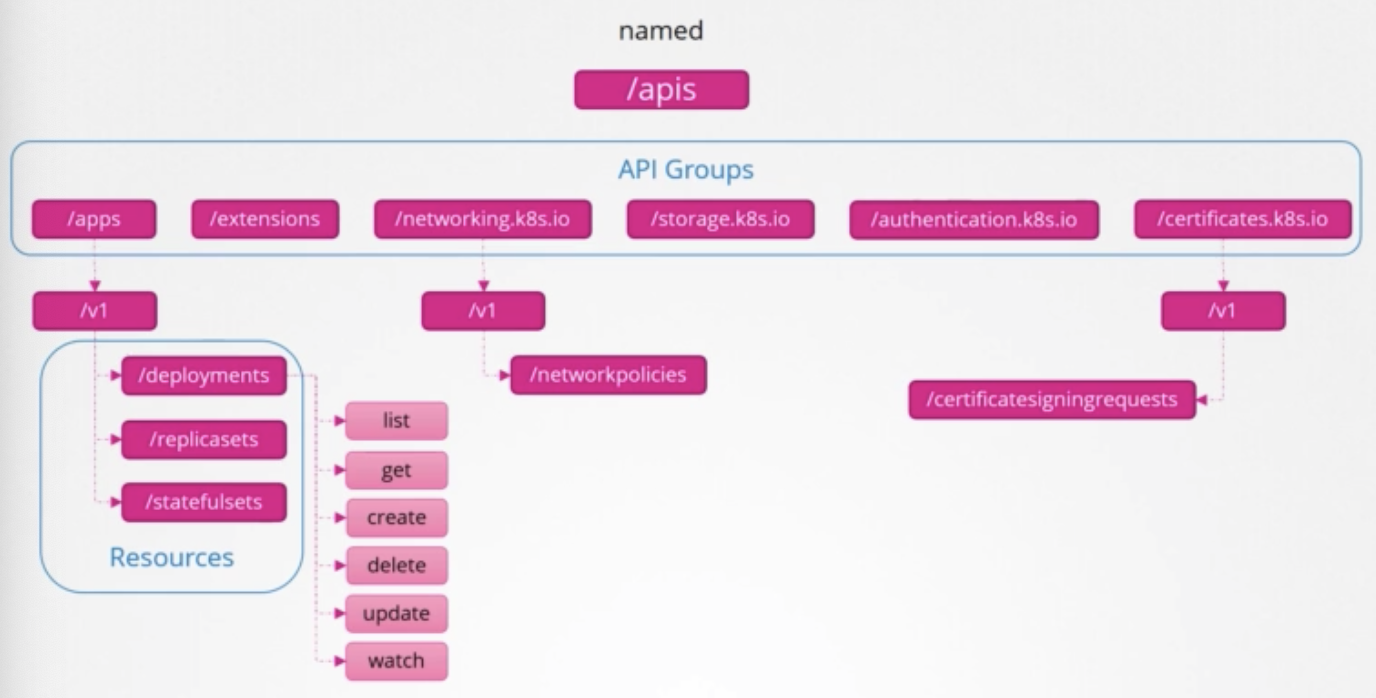
- named group
- CLT
curl <http://localhost:6443> -kcurl <http://localhost:6443> -k | grep "name"- need certificates file
kubectl proxy- to see proxy
kube proxy≠kubectl proxykube proxy- enable connectivity betewwnd pods and services across different nodes in the cluster.
kubectl proxy- HTTP proxy service created by kubectl utility to access the kube-api sever
Authorization
Authorization Mechanisms
Types
- Node
- ABAC
- RBAC
- Webhook
Node
- Node Authorizer
ABAC
User Attribute Based Authorization
- dev-user
- → Can view PODs
- → Can create PODs
- → Can delete PODs
1{"kind": "Policy", "spec": {"user": "dev-user", "namespace": "*", "resource": "pods", "apiGroup": "*"}}
RBAC
Rule Based Authorizaion
- Developer
- → Can view PODs
- → Can create PODs
- → Can delete PODs
- definition
1 2 3 4 5 6 7 8 9apiVersion: rbac.authorization.k8s.io/v1 kind: Role metadata: name: developer rules: - apiGroups: [""] resources: ["pods"] verbs: ["list", "get", "create", "update", "delete"] resourceNames: ["blue", "orange"]- rules have 3 sections
apiGroupsresourcesverbs
- rules have 3 sections
- link users to rule
1 2 3 4 5 6 7 8 9 10 11 12apiVersion: rbac.authorization.k8s.io/v1 kind: RoleBinding metadata: name: devuser-developer-binding subjects: - kind: User name: dev-user apiGroup: rbac.authorization.k8s.io roleRef: kind: Role name: developer apiGroup: rbac.authorization.k8s.io - view
kubectl get roleskubectl get rolebindings
- Check Access
kubectl auth can-i create deploymentskubectl auth can-i delete nodeskubectl auth can-i create deployments --as dev-user
Webhook
- outsource all the mechanism
AlwaysAllow
- always allow
AlwaysDeny
- always deny
Setting
| |
- default :
AlwaysAllow - multiple mode:
1Node,RBAC,Webhook- if one’s requiest is denied, it pass to next chain
- if approved no more checks.
Inspect
1kubectl describe pod kube-apisever-controlplane -n kube-system--authorizastion mode
Cluster Roles
Types
- namespace ← role
- pods
- replicasets
- …
kubectl api-resources --namespaced=true
- cluster scoped
- nodes
- pv
- …
kubectl api-resources --namespaced=false
Clusterroles
- Cluster admin
- Can view Nodes
- can create Nodes
- Can delete Nodes
- definition
1 2 3 4 5 6 7 8apiVersion: rbac.authorizastion.k8s.io/v1 kind: ClusterRole metadata: name: cluster-administrator rules: - apiGroups: [""] resources: ["nodes"] verbs: ["list", "get", "create", "delete"]
Clusterrolebining
- definition
1 2 3 4 5 6 7 8 9 10 11 12apiVersion: rbac.authorization.k8s.io/v1 kind: ClusterRoleBinding metadata: name: cluster-admin-role-binding subjects: - kind: User name: cluster-admin apiGroup: rbac.authorization.k8s.io roleRef: kind: ClusterRole name: cluster-administrator apiGroup: rbac.authorization.k8s.io
Image Security
Private Repository
Login to private repository
docker login private-registry.iodocker run private-registry.io/apss/internal-app
Create secret
| |
Create pod
- definition
1 2 3 4 5 6 7 8 9 10apiVersion: v1 kind: Poid metadata: name: nginx-pod spec: containers: - name: nginx image: private-registry.op/apps/internal-app imagePullSecrets: - name: regcred
Security Context
- definition for pod
1 2 3 4 5 6 7 8 9 10 11apiVersion: v1 kind: Pod metadata: name: web-pod spec: securityContext: runAsUser: 1000 containers: - name: ubuntu image: ubuntu command: ["sleep", "3600"] - definition for container
1 2 3 4 5 6 7 8 9 10 11 12 13apiVersion: v1 kind: Pod metadata: name: web-pod spec: containers: - name: ubuntu image: ubuntu command: ["sleep", "3600"] securityContext: runAsUser: 1000 capabilities: add: ["AMC_ADMIN"]capabilities- only supported at the container level
Network Policy
Ingress & Egress
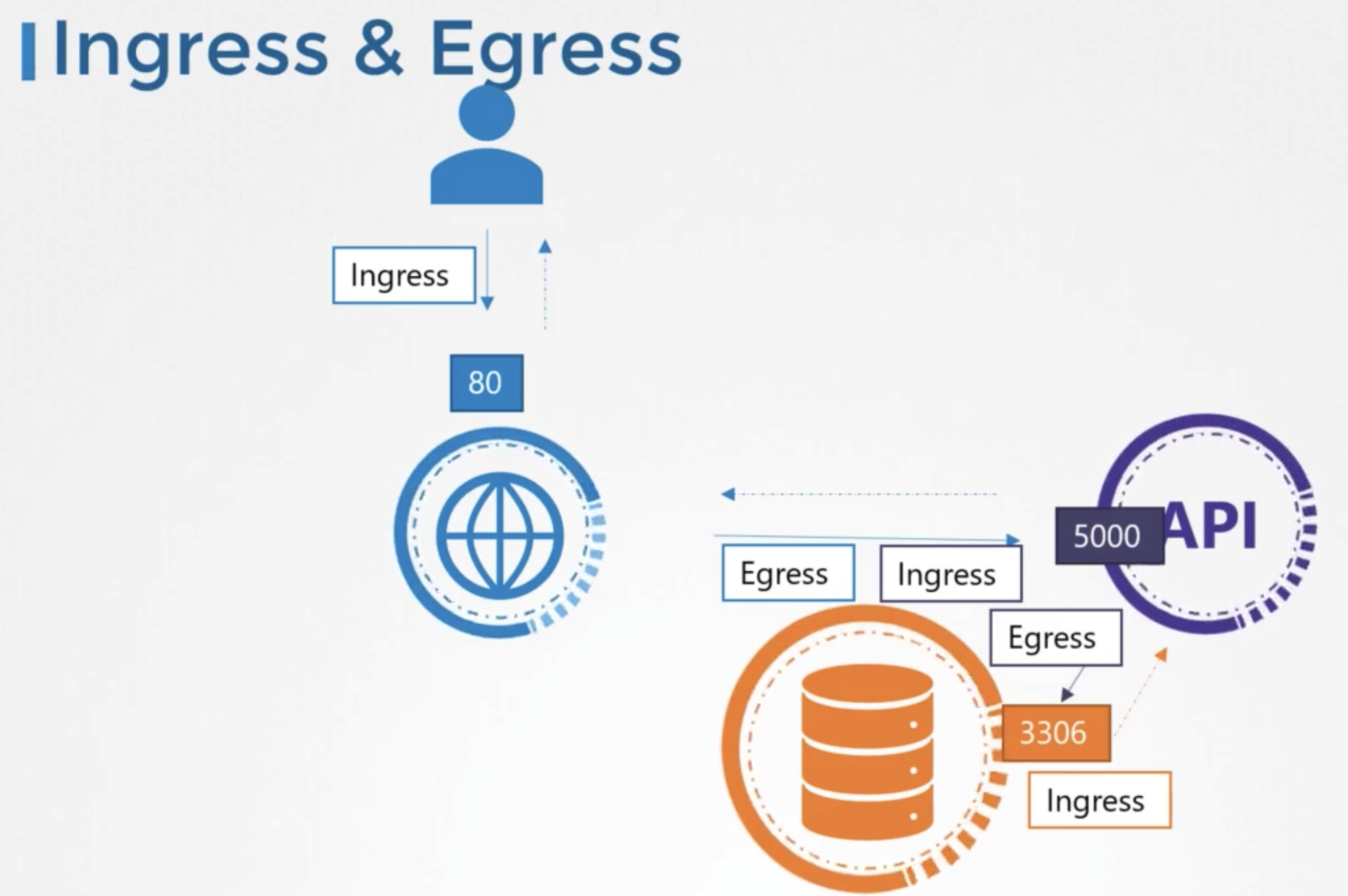
- ingress
- for a web serever the incoming traffic from the users is an ingress
- egress
- outgoing request to the app server
- allow external calls
traffic

Network Security
- Network Policy
- eg) Allow Ingress Raffic From API pod on Port 3306
Selectors
- definition
1 2 3 4 5 6 7 8 9 10 11 12 13 14 15 16 17 18apiVersions: networking.k8s.io/v1 kind: NetworkPolicy metadata: name: db-policy spec: podSelector: mathLabels: role: db policyTpes: - Ingress ingress: - from: - podSelector: matchLabels: name: api-pod ports: - protocol: TCP port: 3306
Network Policies
- network policy to pod to protect
- defintion
1 2 3 4 5 6 7 8apiVersions: networking.k8s.io/v1 kind: NetworkPolicy metadata: name: db-policy spec: podSelector: mathLabels: role: db
- defintion
- what type of policies?
- ingress or egress or both ?
- allow incoming request → ingress
- if incoming request is allowed, response is allowed automatically
- definition
1 2policyTpes: - Ingress
- define specific rules
1 2 3 4 5 6 7 8ingress: - from: - podSelector: matchLabels: name: api-pod ports: - protocol: TCP port: 3306 - allow only in prod namespace
- definition (and)
1 2 3 4 5 6 7 8 9 10 11ingress: - from: - podSelector: matchLabels: name: api-pod namespaceSelector: matchLabels: name: prod ports: - protocol: TCP port: 3306- if only
namespaceSelectoris defined- allow or request in same namespace
- if only
- definition (or)
1 2 3 4 5 6 7 8 9 10 11ingress: - from: - podSelector: matchLabels: name: api-pod - namespaceSelector: matchLabels: name: prod ports: - protocol: TCP port: 3306- use array
- definition (and)
- to backup in server
1 2- ipBlock: - cidr: 192.168.5.10/32 - to push to bakcup server
1 2 3 4 5 6 7 8 9 10 11 12 13 14 15 16 17 18 19 20 21 22 23 24 25 26apiVersions: networking.k8s.io/v1 kind: NetworkPolicy metadata: name: db-policy spec: podSelector: mathLabels: role: db policyTpes: - Ingress - Egress ingress: - from: - podSelector: matchLabels: name: api-pod ports: - protocol: TCP port: 3306 egress: - to: - ipBlock: cidr: 192.168.5.10/32 ports: - protocol: TCP port: 80