Basic Docker Commands
Containers
Start a container
docker run nginx- if image is not present pull image from docker hub
- if image is present it will reuse
docker run -it nginx bash- to see directly in terminal use
-itoption
- to see directly in terminal use
Give name to a container
docker run --name <name> <image>
List containers
→ docker randomly give conatiner_id and names to running container
docker ps- list containers
- running containers
docker ps -a- running containers + previously stopped or exited containers
Stop a container
docker stop <container id>docker stop <docker name>- no running containers
- remains in
docker ps -awithExitedstatus
Remove containers
→ when want to get rid of it from lying space
docker rm <container id>docker rm <docker name>- no longer present in
docker ps -a
- no longer present in
Get container ids
docker ps -aq- remove all containers
docker rm $(docker ps -aq)
Images
List images
docker images
Get all image ids
docker images -aq
Remove images
docker rmi nginx- delete all dependent containers to remove image!
Download an image
docker pull nginx- only pull image, not run docker image
Docker run
No hosting in docker
Containers are not meant to host an operating system.
Containers are meant to run a specific task or process.
- such as to host an instance of a web server or application server, …
Once the task is complete the container exits a container.
Container only lives as long as the process inside it is alive.
Append a command
docker run ubuntu sleep 5
Execute a command
I would like to see the contents of a file inside some particular containers.
docker exec <run name> cat /etc/hosts
Attach and Detach
docker run kodekloud/simple-webapp- when attached, you can not do anything.
docker run -d kodekloud/simple-webapp- detach mode, it runs in background mode.
- To attach again
docker attach <name or run_id>
Docker Run
Tag
docker run <image>:<tag>- no specific tag → use
latesttag.
- no specific tag → use
STDIN
by default, docker container does not listen to standard input, even attached.
-i- interactive mode
-t- pseudo terminal
-it- use two options
PORT Mapping
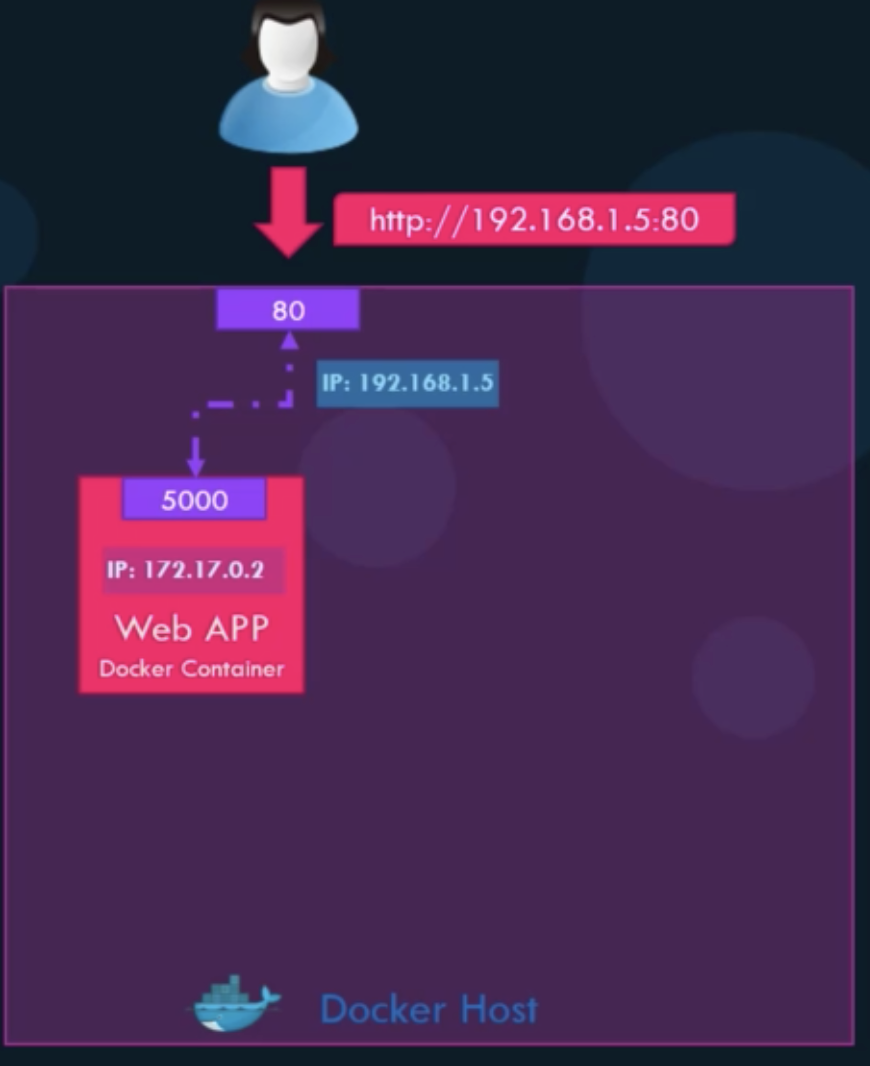
- IP of docker container
- internal IP and is only accessible within the docker host.
- IP of docker host
-pdocker run -p <host_port>:<internal_port> <image name>
Volume Mapping
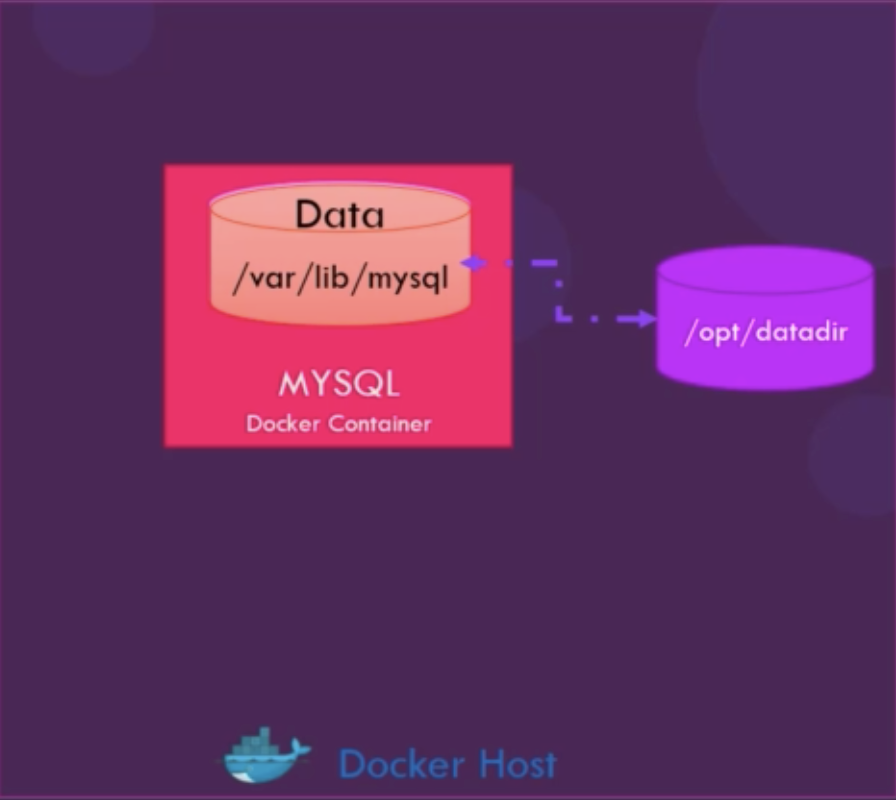
- docker container has its own isolated file system.
- if want to persist data, map a directory outside the container on the docker host to ad directory inside the container
-vdocker run -v <host volume>:<docker volume <image name>
Inspect Container
docker inspect <container id | name>
Container Logs
docker logs <container id | name>